The Best Website Design for Dentist Practices That Actually Book Appointments
Your dental website probably looks stunning. Professional photography, award-worthy design, maybe even recognition from web design galleries. But here's what...

Your dental website probably looks stunning. Professional photography, award-worthy design, maybe even recognition from web design galleries. But here's what matters: if patients aren't booking appointments directly from your site, all that visual polish is expensive decoration masquerading as marketing.
The uncomfortable truth? Most dental websites are built to impress other dentists and web designers, not to convert anxious patients scrolling at 10 PM into confirmed appointment slots.
Consider this gap: 69% of patients research dentists online before booking, but only 26% of practices offer real-time online scheduling. Your evening searchers are going to competitors who let them book right now, not wait for a Tuesday callback.
The 10-second rule for dental website conversion
Every design decision should answer one question: does this move a patient closer to booking an appointment, or does it just look professional?
Here's the framework that separates booking engines from digital brochures: How many seconds of active effort does it take a new patient to go from your homepage to a confirmed appointment slot?
Break it down:
- Finding the booking button on your homepage
- Clicking without confusion about what happens next
- Selecting their service or preferred provider
- Choosing an available time slot
- Confirming their appointment
Ten seconds of effort. Not ten minutes plus phone tag.
The best website design for dentist practices prioritizes this conversion flow above aesthetic considerations. Nearly 20% of patients abandon booking when they encounter friction like callback forms or "we'll contact you" messages.
Most dental sites require 4-6 clicks and a phone call during business hours. Your weekend searchers walk away.
What converts on dental homepages (beyond pretty pictures)
Above the fold essentials
Everything important must be visible without scrolling. Practice name, service area, one crystal-clear call-to-action, and click-to-call phone number. That's your entire above-the-fold real estate budget.
Kill the hero slider. Those rotating banners with five different messages dilute focus and slow load times. One strong message beats five weak ones competing for attention.
Your homepage hero should answer three questions in three seconds: what do you do, where are you located, how do I book?
The CTA that works
"Book Your Cleaning" outperforms "Contact Us" because it matches patient intent. "Schedule Your Visit" beats "Learn More" because it's specific and actionable.
Make your booking button sticky—visible on scroll, present in the header, repeated at logical decision points. The booking CTA should be the most visually prominent element on every page, not buried in dropdown navigation.
Prominent CTAs with omnichannel access drive significantly more conversions. That means booking widgets, QR codes in your office, links in your social profiles—every touchpoint connecting to the same real-time scheduling system.
Mobile speed kills more bookings than bad design
Most dental website traffic happens on mobile devices. If your site takes more than 2-3 seconds to load, you're losing patients before they see your content.
Common mobile killers include:
- Uncompressed before-and-after photo galleries
- Third-party chat widgets loading synchronously
- Unoptimized practice management system integrations
- Custom fonts loading from external servers
Quick fixes: compress images using WebP format, lazy-load content below the fold, minimize third-party scripts. Test on actual phones, not desktop browser simulators.
Run your site through Google's PageSpeed Insights right now. Mobile scores below 70 cost appointments daily.
Online booking integration that actually works
Real-time scheduling vs. request forms
There's a massive difference between these approaches. Contact forms ask patients to submit information and wait for callbacks. Real-time scheduling lets them pick available slots and confirm immediately.
The data tells the story: practices switching from request forms to real-time booking see 10x increases in monthly appointments. About 20% of patients abandon when they encounter "request a callback" instead of actual appointment slots.
"Request a callback" isn't online booking. It's a digital answering machine creating work for your staff and frustration for patients.
Practice management system integrations
The best website design for dentist practices includes seamless PMS connectivity. Here's how major platforms compare:
| Platform | Integrates With | Strength | |----------|-----------------|----------| | NexHealth | Dentrix, Eaglesoft, Open Dental | Deep two-way sync, automated reminders | | Weave | Multiple PMS | Combines booking with communication tools | | Dental Intel | Dentrix, Eaglesoft, Open Dental | Scheduling with practice analytics | | RevenueWell | Dentrix, Open Dental | Marketing and scheduling integration |
Setup considerations: provider-specific availability, appointment-type rules, buffer time for procedures, insurance pre-filtering to reduce no-shows.
After-hours booking advantage
Most practices close at 5 PM. Most patients search for dentists at 9 PM. If your website can't book appointments after hours, you're abandoning evening searchers to competitors.
AI chatbots handling after-hours visitors see 84% lifts in bookings. These tools triage common questions, guide patients to scheduling, and collect new patient information.
Keep expectations realistic. AI chat supplements real-time booking; it doesn't replace it.
Trust signals that move patients from browsing to booking
Reviews where decisions happen
Don't bury patient reviews on testimonials pages nobody visits. Surface them on your homepage, near booking CTAs, and on service pages where patients make decisions.
Google reviews with proper schema markup display star ratings directly in search results—trust before patients click through. The benchmark is 300+ reviews at 4.8+ rating to outperform competitors.
Embed live Google Reviews widgets showing recent feedback, not static screenshots that look staged.
Real team photos and human bios
Authentic photos of your team and office reduce "what will it be like?" anxiety. This matters more in dentistry where patients arrive already nervous.
Bios should be human, not credential lists. Mention something personal. Patients want to trust a person, not a resume.
Insurance and pricing transparency
Display accepted insurance logos prominently—often the first filter patients apply. Include insurance verification widgets or detailed FAQs when possible.
Pricing transparency builds trust. Even ranges help. "Call for pricing" signals hassle and potential sticker shock.
Layout patterns that convert patients
High-converting page structure
From top to bottom:
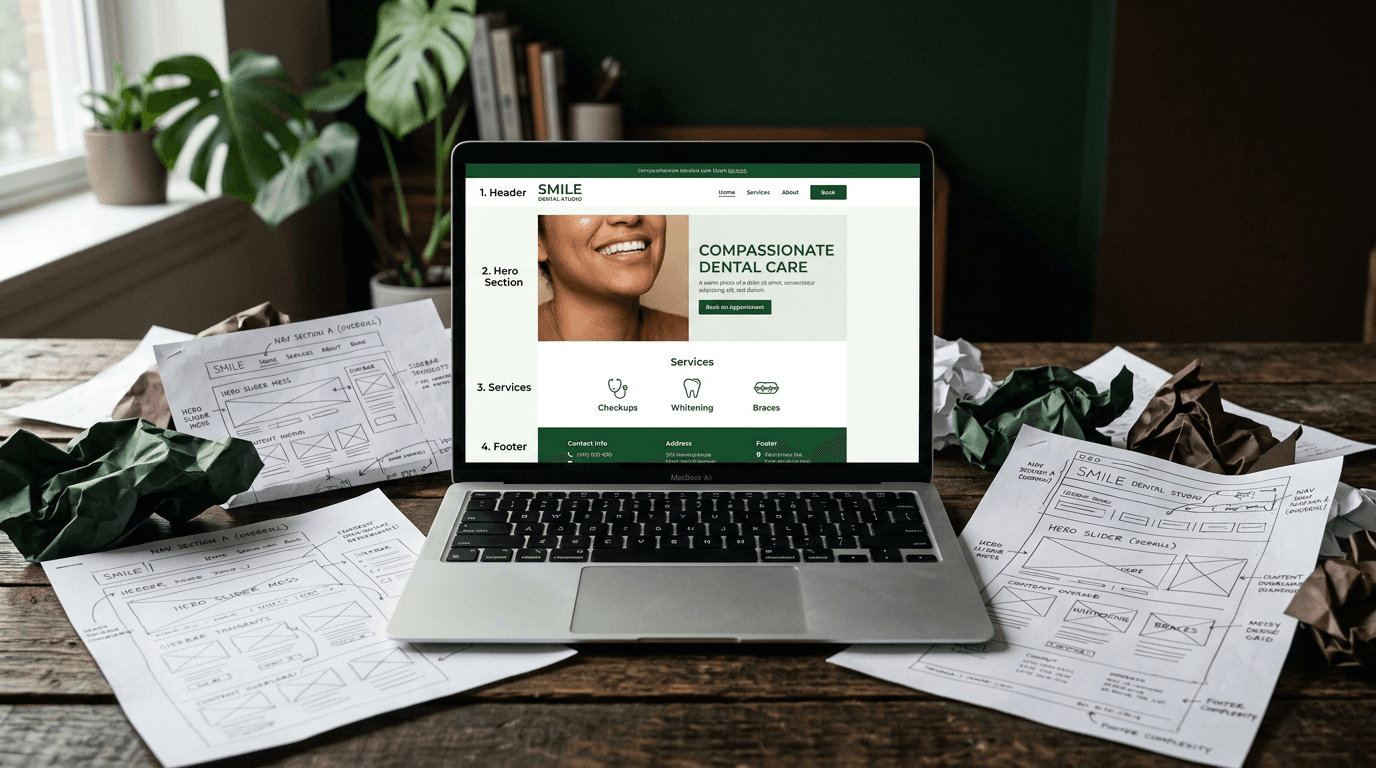
- Header: Logo, click-to-call phone, "Book Now" button (sticky on scroll)
- Hero: One clear headline (service + location), prominent CTA, trust signal (rating)
- Social proof: Google rating, review count, years in practice
- Services: 4-6 cards with icons, each linking to pages with booking CTAs
- Trust section: Team photo, brief about paragraph, credentials
- Testimonials: 2-3 featured reviews with patient names/photos
- FAQ accordion: Address insurance, pain management, costs, first visits
- Final CTA: "Ready to book?" with phone, booking button, current hours
Small changes that work
Sticky booking buttons following users on scroll keep the primary action available at every decision point. Exit-intent triggers on mobile back-buttons offering "Book before you go" recapture abandoning visitors.
Appointment-type selectors in CTAs ("Cleaning," "Emergency," "Cosmetic") reduce friction by pre-qualifying visits. These aren't aggressive tactics—they're convenience features.
Investment expectations for conversion-focused design
Set realistic expectations:
Template Route: $200-2,000. WordPress themes, Squarespace, or PMS website builders. You handle setup. Good for basic presence but limited booking integration.
Professional Build: $3,000-8,000. Custom design with PMS integration, mobile optimization, basic SEO. Most established practices choose this path.
Conversion-Focused: $8,000-15,000. Includes real-time booking, speed optimization, conversion testing, performance monitoring. Higher upfront cost but measurable ROI.
Monthly Costs: Hosting ($20-100), scheduling platform ($100-300), security and maintenance ($100-200). Budget $200-600 monthly for fully functional booking systems.
The real cost isn't the website build—it's appointments you lose monthly with sites that don't convert. Practices losing 10 potential appointments monthly to poor website experience lose $15,000-25,000 in annual revenue.
Frequently asked questions
How quickly should I see more appointments from website improvements? Speed optimizations and prominent booking CTAs typically show results within 2-4 weeks. Full conversion optimization with new booking systems takes 60-90 days to reach potential as Google re-indexes your improved site.
Do I need to replace my practice management system to add online booking? No. Most scheduling platforms integrate with existing systems like Dentrix, Eaglesoft, and Open Dental through APIs. Integration syncs both ways—online bookings appear in your PMS, and your availability shows in the online widget.
What's the biggest mistake dental websites make with mobile users? Slow load times. Most dental sites are built for desktop and adapted for mobile as an afterthought. Since most traffic is mobile, this kills conversions before patients see your content.
How many online appointment requests should I expect monthly? Well-optimized sites convert 8-15% of visitors into appointment requests. For practices getting 500 monthly website visitors, that's 40-75 requests. Current industry average is closer to 2-3%.
Should my booking system allow patients to choose specific providers? Yes, if you have multiple dentists. Patients often have preferences based on reviews, specialties, or previous visits. Provider-specific booking reduces scheduling conflicts and increases satisfaction.
Your website's real job
Your website doesn't need design awards. It needs to fill your schedule.
The best website design for dentist practices prioritizes patient conversion over industry recognition. Every day you optimize for compliments instead of bookings, appointments go to competitors who made scheduling their priority.
Start with the 10-second rule audit. Time how long it takes a new patient to go from your homepage to confirmed appointment. If it's more than 10 seconds of active effort, you know where to begin.
The practices winning in 2026 aren't the ones with the prettiest websites. They're the ones where anxious patients can book appointments at 10 PM on Sunday without picking up the phone.